
DM First Register – Complete Registration Guide
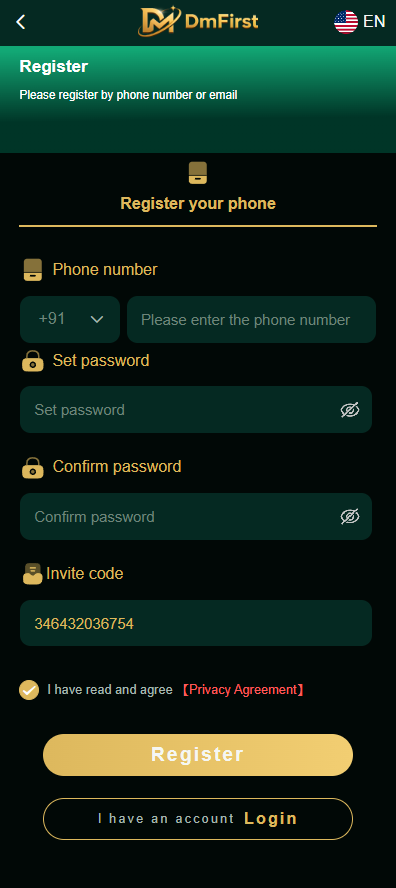
The DM First Register page is designed for users who want to create an account on the platform. The registration interface displays phone number registration, password creation, password confirmation, an invite code field, and a checkbox for the Privacy Agreement.
Before registering, check that you are using the correct website and understand the platform’s terms and privacy practices.
How to Register on DM First
Follow these general steps to complete the registration process:
- Open the DM First website using a domain you have verified.
- Select Register to open the registration page.
- Enter your phone number with the correct country code, or use the email option if it is offered.
- Create a strong password in the Set Password field.
- Enter the same password in the Confirm Password field.
- Enter an invite code if the form requires one or you have a valid code.
- Read the Privacy Agreement and other applicable terms.
- Select the agreement checkbox only after reviewing the terms.
- Check your details and tap Register.
The registration requirements may vary depending on the current version of the service. Follow the instructions displayed on the registration page.
Register With a Phone Number
The DM First registration interface displays a country-code selector alongside a phone number field. Choose the appropriate country code and enter the mobile number you want to register.
For Indian users, the +91 country code may be relevant. Make sure the number is accurate and that you can access it if the service requires verification.
Set and Confirm Your Password
During registration, you may be asked to create a password and enter it again for confirmation.
For better account security:
- Use a password that is difficult to guess.
- Avoid using your name, birthday, or simple number sequences.
- Do not reuse a password from another account.
- Store your password securely.
- Never share your password with anyone.
If the two password fields do not match, check both entries and try again.
What Is the DM First Invite Code?
The registration interface includes an Invite Code field. An invite code may be used to identify a referral or promotional source, depending on the platform’s rules.
The screenshot shows a prefilled code, but that does not establish that the code is universal, active, or valid for every account. Check the instructions on the official registration page before using a code.
Do not pay an unknown person for an invite code or rely on claims that a code guarantees rewards or winnings.
Privacy Agreement Before Registration
The registration screen includes a Privacy Agreement link. Read the applicable agreement before submitting personal information. Check what information the service collects, how it may be used, and how to contact the service about privacy questions.
Do not submit sensitive information if you cannot verify the website or understand why that information is required.
Common DM First Registration Problems
Passwords Do Not Match
Check the Set Password and Confirm Password fields. Both entries must match the requirements shown on the page.
Phone Number Is Invalid
Confirm the country code and check the number for missing or extra digits.
Invite Code Is Not Accepted
The code may be incorrect, expired, or subject to restrictions. Check the code’s source and the platform’s instructions.
Registration Does Not Complete
Review any error message, check the required fields, and make sure your internet connection is working. If the problem continues, contact verified customer support.
Frequently Asked Questions
How do I register on DM First?
Open the verified website, select Register, enter the required details, set and confirm your password, review the terms, and submit the form.
Is an invite code required?
The screenshot shows an invite code field, but whether it is mandatory depends on the current registration requirements.
Can I register with email?
Use an email registration option if it is available on the current registration page.
Can I create another account if registration fails?
First check whether you already have an account or whether the existing registration can be recovered. Follow the service’s account rules rather than creating duplicate accounts to bypass restrictions.
Is registration the same as receiving a bonus?
No. Creating an account does not automatically establish eligibility for a particular bonus. Check the applicable promotion terms separately.
Responsible use: Only eligible adults aged 18 and above should participate in real-money gaming, and only where permitted by applicable law. Registration does not guarantee rewards, winnings, or withdrawals.